|
| Getting Started |
| Step 3: Documenting the Dollar Impact
|
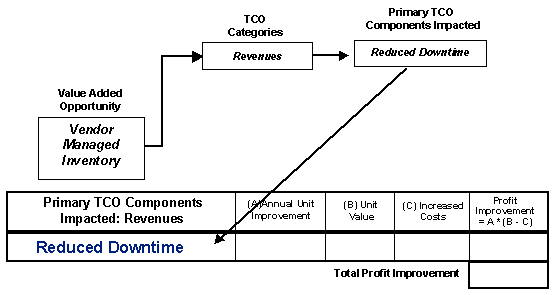
Once the Impact Diagram is completed for a specific
event, you must now transition from identifying
the impact to measuring it. Simply put, this means
taking the Primary TCO Components Impacted fields
from the Impact Diagram and transferring them to
worksheets as the points to be measured. This transition
only begins Step 3.
Each TCO Category has a different worksheet. Each
worksheet requires different information to be gathered
in order to document the impact the supplier has
on the customer's profits. It is critical that the
right components be put into the right worksheet
in order to measure it properly. If inventory reduction
were to be measured using any other worksheet than
the asset worksheet, it would result in an incorrect
estimate of the profit impact. For that reason,
the Impact Diagram is a beneficial tool that helps
ensure the correct impact points are measured properly.
Each worksheet has four labeled columns. These columns
are used to gather the specific information needed
to determine the total cost impact. They were designed
so that different types of information could be
utilized in each of these columns. For example,
column A on the asset worksheet (next page) evaluates
the quantity by which the asset was reduced. This
value could be a physical count of the number of
assets eliminated, the number of lots or units reduced,
or a percentage that indicates part of a lot. Users
can also put formulas in each cell to help calculate
the amount needed.
The last column has a formula for calculating the
Total Cost impact based on these column headings.
When the totals from each worksheet are combined,
the total cost impact from that event can be determined.
|
|
 |
|