When the program is
installed it places an icon in the user’s desktop.
By double clicking this icon a dialog box opens from which
the user can open the program. The dialog box gives the
user three (3) options:
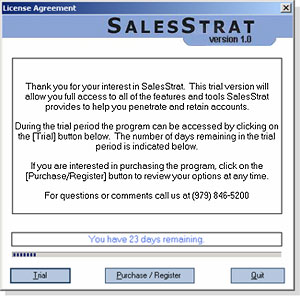 1. Trial: Opens the program and allows the user to evaluate
the program for a specified time frame. The trial period
starts the first time the program is opened.
1. Trial: Opens the program and allows the user to evaluate
the program for a specified time frame. The trial period
starts the first time the program is opened.
2. Purchase/Register: When the trial period ends, or
the user chooses to purchase the program, the second
option provides three choices. The user may register
the program online, register over the phone or purchase
the program online by credit card.
3. Quit: Closes the dialog box and does not open the
program.
|